Self-hosted software development factory
How I vibe-coded a remote, agentic, fully self-hosted, software development factory.
Recently, I have described my vibe-coding setup, and I mentioned there how my MacBook is getting warmer and no longer holding the battery, now that I run a bunch of VMs on it. In that article, I said that it would be cool to buy a machine that will be at home, to which I can VPN from my laptop and monitor my army or LLM agents who do the work for me 24/7. Well, I’m glad to say that I have achieved that.
In this article I would like to describe what have I made, and how it works. With the advent of AI summarization tools, I believe that not many humans will read this, so I guess my main reason for writing this to try to understand myself what have I done and how it works, but also inspire others who still like to read human generated content, to perhaps experiment.
AI is great for doing risky experiments, but at the same time I do see the downsides in the fact that people no longer consume human written content, and every blog post is scraped a thousand times, shredded into tokens, and fed back to users through “AI Overview”. You can check out my other blog post about my AI bipolar disorder: I think I have AIpolar disorder.
Lastly, this article will be split into sections that build from the ground up, starting with hardware, moving to networking, virtualization, software, and harness. Feel free to skip/skim any section that is not relevant or interesting for you. Enjoy your reading.
Goals and motivation#
As I said earlier, my main goal was to get work off my laptop into an always-on machine at home to which I can VPN from anywhere. This machine would run virtual machines (a VM per project) which will run agentic harnesses like Claude code (with an option to expand to more harnesses). Everything needs to be as isolated as possible, and easy to recreate in case of a VM killed by misbehaving. This means zero setup by hand, and as much automation as possible.
On top of that, every service I use needs to be self-hosted. No dependency on public services, no subscriptions. Aside for custom harness and control, there should be no custom app, and the setup should reuse existing services as much as possible.
There are many various control panels for agents developed by various people. I explicitly decided against using these because they are most likely vibe-coded or VC-funded. I had the time, and my own vibe-coding abilities, to create something that works for me, rather than building my workflow around a tool by some YouTube influencer.
Hardware and virtualization#
At the core of everything lays a refurbished Dell Optiplex Micro 7010 with 13th Gen Intel Core i5-13500T, and 32 GB of RAM. I tried to find i7, but couldn’t find any in the Micro chassis. And 32GB already costed me a hefty amount, so 64GB will have to wait for some time in the future. I wanted a Micro chassis because it’s small, quiet, and low on power consumption. It runs Proxmox as base OS. Since I already owned a Lenovo ThinkCentre Tiny, which also runs Proxmox, I opted for Proxmox datacenter manager to manage both hosts with pulse to monitor both.
Networking#
I had a long debate with myself whether I should put everything in one VLAN or separate services from dev machines, and ultimately decided on the latter. Every supporting service (git, CI/CD, and others; more on them in the next section) run in their own VLAN which is separated from the VLAN where dev machines run. There are tiny holes that allow dev machines to speak to the needed services, but ultimately, a rouge AI agent can’t scan the entire network and find management ports for my CI/CD services or something else. The worst a compromised VM/Agent can do is list all other VMs in its own VLAN, and maybe access the dev web version of whatever the dev machine is running. This complicated things a bit, especially around DNS and a bunch of holes in VLAN ACLs, but it is a cleaner separation.
For your convenience, going further, I will call the VLAN that hosts services srv and the VLAN that runs the dev machines dev.
Services#
DNS and DHCP#
First, I bought a domain. This allows me to get SSL certificates, and rids me of the necessity to remember a bunch of IPs.
Then, inside srv VLAN I run Technitium which is a light DNS and DHCP server.
Technitium is responsible for resolving internal domains, as well as creating a “Magic DNS” for each new dev machine.
I wanted every new dev machine with a host name of host to get a domain under *.dev.[domain].net so it becomes [host].dev.[domain].net.
Technitium is set up as the DHCP server for the dev VLAN.
When a dev machine boots, it advertises its host name to Technitium, and it creates a DNS record for it.
However, there is one problem with this approach.
DHCP requests are broadcasts, and broadcasts can’t cross VLAN boundary.
This is usually solved by a built-in DHCP relay on the Router, by mine does not have it, so I had to run a small LXC in dev to act as a relay.
dnsmasq acts as the DHCP relay between dev and srv.
Git and CI/CD#
I self-host Forgejo as my git repository and UI. I also self-host the Forgejo runner that runs the jobs. The runner actually sits in a completely different VLAN, which is completely isolated from the rest of the VLANs (except for a tiny tiny hole to reach out to Forgejo instance to register itself). The reason I did it this way is that runner runs a bunch of code that is downloaded from the internet and package repositories. I didn’t want the risk of the runner getting compromised to risk the rest of my network.
In Forgejo I use Forgejo actions (which are like GitHub Actions) in order to check my code.
I used to run deploys via Forgejo actions as well, but this meant that Forgejo secrets had private SSH keys to production servers.
main branch is always protected, and deploys happen only from main (after I review and approve), but an agent running in a dev VM could still create a workflow that dumps all the secrets (including private SSH keys), and then forward it to whoever instructed it to do so.
For this reason, I had to move deploys to Semaphore UI.
Semaphore holds the private keys, and it only deploys using a custom deploy script, from a webhook from Forgejo run that finished in main.
Since agents can’t push to main, and everything that goes into main is reviewed and approved by me, agents do not have access to secrets in Semaphore.
They can still slip a poisoned code that gets built into an artifact and deployed, but oh well…
The world is far from perfect.
Secrets and environment variables#
Last, but not least, are API keys and anything else that the agent should not have access to.
I opted to running agent-vault by Infisical to act as a proxy that hold the API keys and other secrets, so agents never have access to them.
During the initial set up (more on that later), I create and populate a vault for each dev VM with the relevant secrets, and set up the CA certificates on the machine, so everything will trust the proxy.
Standalone agent-vault is no longer the recommended way to use it, and Infisical are pushing you towards using their platform.
I think my next step will be to ditch agent-vault in favor of a wrapper around mtimproxy.
It’s important to note that agent-vault is its own LXC container, in a srv VLAN.
This means that agents can’t bypass it.
They can decide to ignore it, but the requests would simply fail as the dev VM never holds any API keys or secrets.
Control center and VM provisioning#
As I said earlier, VMs are some-what disposable. If they get corrupted or hijacked, I should be able to just destroy them and re-create with as little hassle as possible. This means their creation needs to be configured in code.
For the initial VM provisioning I used cloud-init from a template in Proxmox, and for further provisioning I used Ansible.
I also wrote a small control program called kamino which orchestrates the cloud-init and ansible calls.
An interactive CLI prompt that runs on my Mac, asks me for the Proxmox host, VM size, and using an admin Forgejo token picks the relevant repository(ies) to clone into the VM.
It also creates a special bot user in Forgejo which will be used by the VM and gives it read and write access to the repository as a collaborator.
It also provisions the agent-vault with the relevant secrets (that are stored in a password manager on my laptop), and basically creates an entire development environment.
Using ansible it provisions the VM, and using chezmoi it copies my dotfiles into the VM, so the moment I ssh into the VM, I get my tmux setup there with all the needed tools.
Workflow and harness#
My initial instinct was “let’s vibe-code a custom web interface to interact with my agents in the VMs”.
But after carefully considering this, I decided to resort to known and existing tools.
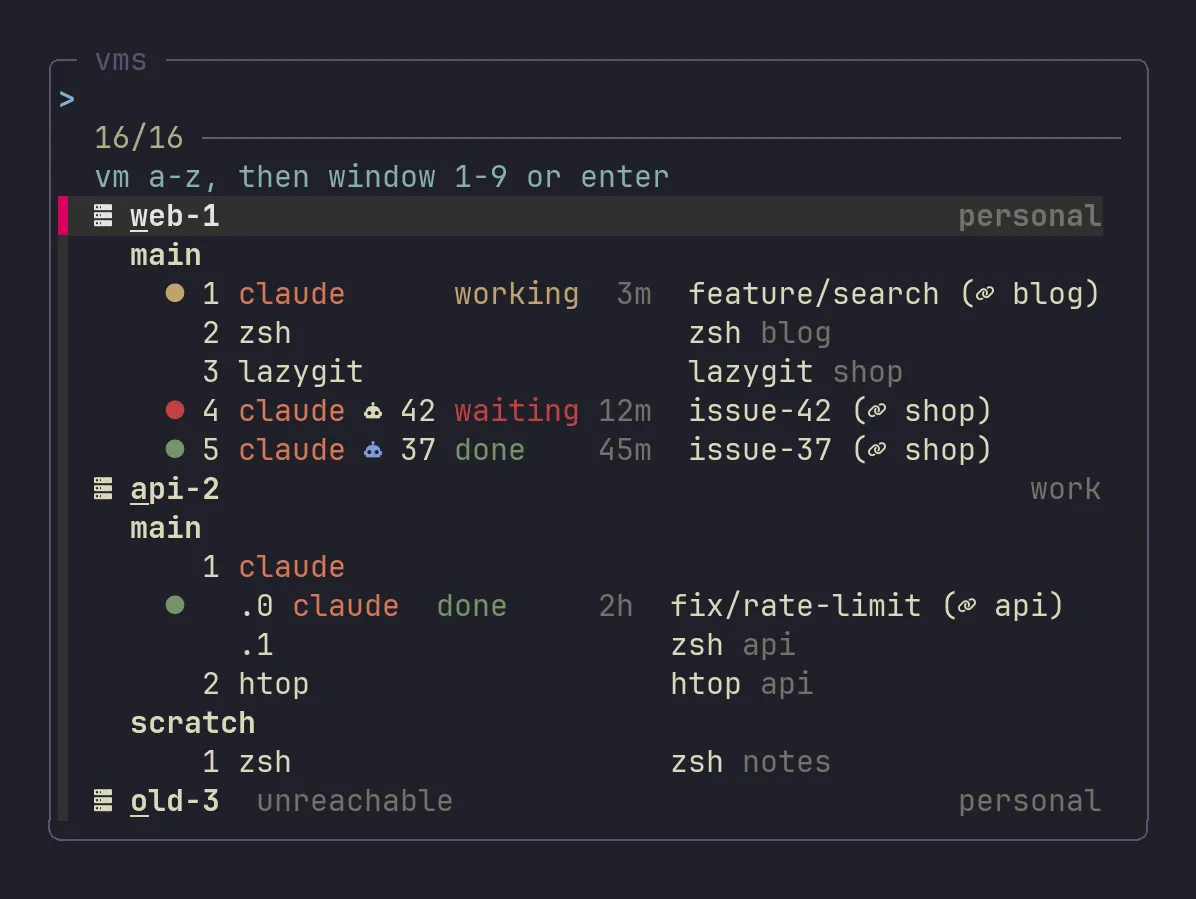
A custom prefix in tmux shows me all the VMs with their agentic runs, similar to what I described in my previous article for my local development.
When I’m in a terminal, I hit prefix J and I see all the VMs, their tmux sessions and all the Claude code sessions: what are they working on and what is their status.
However, the idea was to switch to somewhat autonomous development, i.e. - agents can run on their own, and I only review the output. For that, I had to incorporate two things: immediate tasks, and repeating tasks.
Immediate tasks are things I want to work on right now.
I can always jump into a VM, open a new tmux window with Claude in a worktree and start working.
Or, I can create an issue in Forgejo, label it status/ready and a Claude code instance should pick up.
With different stage/* labels like stage/research, stage/plan, stage/implement, I can further control the agentic flow.
For research, the agent will just research an idea I have; plan will generate a plan for it; and implement will, well, write code.
These are interactive sessions, and they are living as their own tmux windows.
I can jump into them and view what the agent is doing, or even take control and steer the agent further.
Or I can comment on the issue or change its labels to steer the agent.
The session is live as long as the issue is open.
If the VM crashes/reboots, the session will be started with claude --resume on the stable ID of the Forgejo issue, so work on an issue is always done with the full context.
For repeating tasks, I tried to find a good way to handle them.
I didn’t want to develop custom logic around them, and putting them in Forgejo issues felt hacky.
So, inspired by GitHub Agentic Workflows, I decided to write these jobs as markdown files in the repo under .agents/jobs/<job>.md.
The job has a cron or OnCalendar pattern, and a description of what it needs to do.
Using the concept of safe-outputs the job describes what should it’s output be (for example at max one PR, and max 3 issues).
In order to achieve all that, I had to write a custom harness called tipoca.
It’s installed on the VM as part of the provisioning by kamino, and it’s essentially a Forgejo webhook listener with some rules.
Every time something changes in Forgejo (an issue label is changed, a new commit with a periodic job) — tipoca picks it up and orchestrates.
For issues that need work, tipoca launches a new tmux session with Claude in a worktree, and hand it the issue details.
Claude can then create more issues and/or open PRs using the Forgejo API, and it’s bot credentials that kamino provisioned when I created the VM.
For periodic jobs, tipoca sets up a systemd timer, which when fired also creates a Claude session.
However, jobs are riskier than giving an agent an issue that I wrote.
Since jobs can search the internet or get unvalidated input (for example from a sentry issue over which I don’t have control), they do not run with the same privileges as agents started from an issue.
Instead, tipoca makes sure they run on a different Linux user, without sudo, and without access to Forgejo — so they can’t create issues, PRs, or modify code.
The only thing they are allowed to do is tell back tipoca what they want to do: create an issue or a PR, and tipoca using safe-outputs method verifies what the job wants to do, and does that for the job.
tipoca makes sure to give the agent a fresh clone of the code, but all the interactions with Forgejo go through tipoca rather than Claude.
Lastly, I wanted to have a job that will watch Sentry for issues.
Because everything in my setup is local, and nothing is reachable from the wild-wide-web, I can’t set up webhooks in Sentry without opting for using something like ngrok.
So I decided to use tipoca for polling Sentry once in a while in order to watch for new issues, and create a Claude instance per issue.
tipoca maintains full log, and has a small status sub command to tell me what’s going on inside.
It’s also responsible for fast-forwarding main every time main is updated, so the repo copy in the VM is always fresh, and next agent creates a worktree from a fresh copy.
Lastly, there is a nightly systemd job on each VM that pulls the dotfiles and ansible playbooks and applies them to the VM, so every change I make to my dotfiles or the ansible playbooks is always propagated to all the VMs.
I can, of course, update it manually every time I need — and I did so many times during the development of this system — but once it becomes stable, I just want everything to propagate automatically.
I tested this entire workflow, and I was very happy to see when my agent bot reacts to my PR comments, is able to fix PR checks that failed, close issues, create issues, or run periodic jobs. It’s basically an autonomous remote agentic development factory. I operate at the level of Forgejo issues, but I always have the ability to jump into agent or even the code if and when needed. It’s even possible to engage with this workflow from the phone, since I can install any app that supports Forgejo and create issues from there, without having to build a custom control panel. The only thing that requires my laptop is provisioning a new VM, which anyway sounds stupid to do from a phone on the road.
Every failure in the workflow, sends a pushover notification to my phone.
Knowledge#
With autonomous agents doing coding and exploration, they need to be able to store knowledge about the project.
The internal memory of Claude is good, but it’s fragile.
If a VM is destroyed and re-created, all my preferences or things that Claude have learned — are lost.
Therefor, via chezmoi, each VM gets a ~/.claude/CLAUDE.md root file that instructs it on how to store its memory.
When an agent learns something valuable that is worth remembering for future sessions, it will write it into the project’s AGENTS.md, as long as it’s short.
If it’s longer than a paragraph or two, then it will put a markdown file in docs/.
This way all the project knowledge is stored inside the project.
As for global knowledge, I haven’t found a use-case for it yet.
But if it becomes an issue, a shared knowledge repo where agents from different VMs can open a PR — sounds like a good approach.
Epilogue#
Developing this system was a lot of fun, and I got very excited when I saw the first comment by the bot user in Forgejo and Claude code session in a tmux pane that resulted from it.
Even though it was 99% vibe-coded, it still gave me the same level of joy as when I used to write code manually and see some progress.
I would have never even though of attempting to build something like this without AI, as it would take enormous amounts of free evenings, which would simply make me lose motivation half way.
But now, I have mini data-center at home, with DNS and DHCP servers, my own Git server, and a harness around agentic coding. I am no longer tied to my Mac, and I can simply schedule work for the agents and go about my day. I still develop stuff on the Mac locally, and I still follow the same patterns I wrote about in my original article: How I vibe-code. However, for every heavy work or big projects, I will be moving to this remote agentic development workflow.